EN
Compliant with Spanish law from day one

Time tracking and working time record software for businesses

Clock in from a mobile, computer, QR code or fixed terminal at the office. Generate reports for the Inspección de Trabajo (Spanish Labour Inspectorate) and cut errors from day one. Forget about Excel.

Start free, no card needed
Personal support
Secure, accessible data
controlpresencia.gesthoras.com
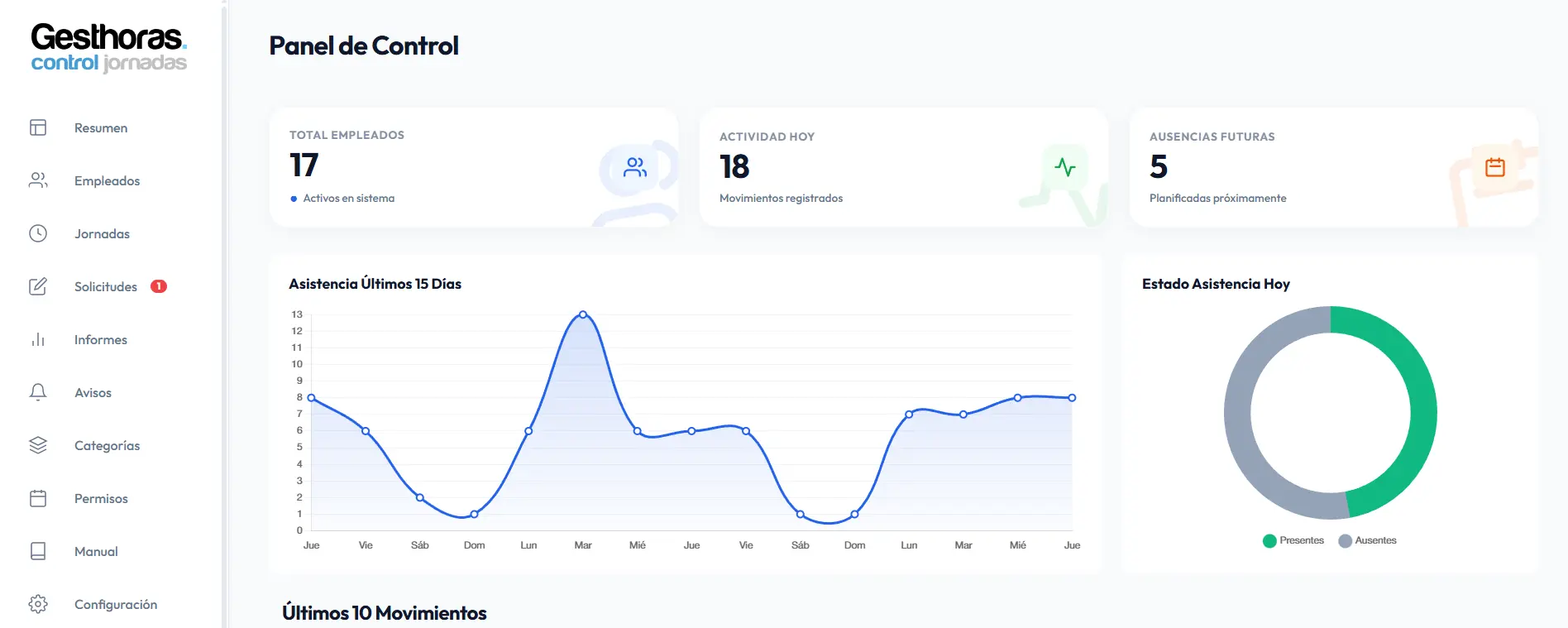
Gesthoras dashboard showing clock-ins and a working day summary
Companies already recording working time with Gesthoras
Client 1 Client 2 Client 3 Client 4 Client 5 Client 6 Client 7 Client 1 Client 2 Client 3 Client 4 Client 5 Client 6 Client 7 Client 1 Client 2 Client 3 Client 4 Client 5 Client 6 Client 7 Client 1 Client 2 Client 3 Client 4 Client 5 Client 6 Client 7
EFFICIENCY
Time tracking features

Clock in within seconds from any device

Staff clock in and out easily throughout the working day.

Instant clock-in

No waiting, no slow processes.

Accessibility

An app that adapts to any need.

Reliability

Track working hours with complete confidence.

Total simplicity

Clock in and manage working time with no hassle.

12:32
Monday, 2 February 12:32:48
CLOCK IN
My Working Days
Working day in progress
00:00:01
Friday, 30 Jan 08:00 - 16:30
8.5h
Thursday, 29 Jan 09:00 - 18:00
9.0h

How working time recording works in Gesthoras

Gesthoras
LOG IN
1. Open the app
12:32 PM
CLOCK IN
2. Start your working day
My Working Days
Monday 02 08:00 - 17:00
9h 00m
Friday 30 08:00 - 16:30
8h 30m
Thursday 29 09:00 - 18:00
9h 00m
3. Review your working days

Geolocation

Records where the working day starts, securely and automatically.

Legal compliance

Meets current regulations on mandatory time recording.

Synchronisation

Working days and clock-ins updated in real time.

Offline mode

Clock in offline. Your records sync as soon as you are back online.

Physical device

RecLog: shared attendance control at your workplace

RecLog is a time clock that records clock-ins and clock-outs quickly and easily. It works with NFC key fobs or cards, identifying each user with no passwords or manual input. It mounts on the wall in minutes and stays out of the way.
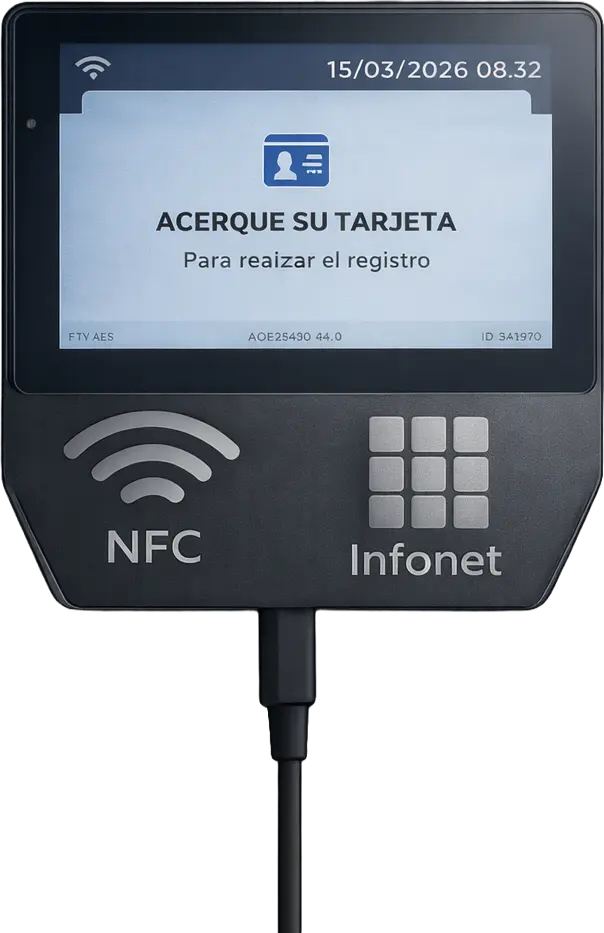
RecLog terminal with NFC reader for clocking in at the office
  • NFC card or key fob reader
  • Clock in anywhere, with or without internet
  • Free updates for life.
View manual
3-year warranty
RecLog terminal with NFC reader for clocking in at the office

Automatic synchronisation

Data is sent to the cloud in real time, wirelessly.

Durable design

Rugged build for industrial settings and offices.

Privacy and security

Secure connection using the latest security protocols.

Already a customer? Get your RecLog with 20% off
Automate and avoid problems

Excel vs Gesthoras time tracking software: say goodbye to errors.

Automate attendance tracking with a smart grid: real-time clock-ins, error-free.

Smart Geolocation

Total Location Control

Make sure your team clocks in at the right place without constant phone calls or manual supervision.

Absence Management

Uninterrupted Planning

Employee Portal

Team Self-Service

BEFORE GESTHORAS INEFFICIENT
File Edit Time_Tracking_v4_FINAL_COPY_TRY_THIS_ONE.xlsx
Employee M T Notes
Juan G. 08:00 08:05 OK
M. Aranda #REF! 09:00 Manual (?)
Carlos P. N/S 08:00 Missing data?
S. Ruiz 08:00 ERROR Check signature
Lucía B. #VALUE! 08:15 ---
T. Gómez 08:00 08:00 To validate
Pedro X. #DIV/0! --:-- MISSED CLOCK-IN
M. Elena 09:12 09:00 Holidays missing
Unknown ??:?? #N/A Who is this?
Roberto F. ERROR 08:30 N/I
L. Vazquez 08:00 #REF! URGENT

Call HR! M. Aranda’s hours are missing

Check??
Wrong calculation, doesn’t add up

Signatures missing

?
Where is he?
Unknown location

Where did Juan clock in?
The time doesn’t add up

Call María to confirm today’s location

Time lost on calls: 2h/day

Absence Scenario (Coming soon)

Portal Scenario (Coming soon)

AFTER GESTHORAS OPTIMISED
100% Synchronised
124 Employees - All OK
Auto-validation
Employee M T W T F
Lucas M.
8.5
8.0
F
F
7.8
Sofía R.
4.0
4.0
8.0
8.5
8.0
Mateo G.
8.0
8.0
8.0
8.0
8.0
Elena V.
F
F
F
F
F
Ana P.
8.0
8.0
8.0
8.0
8.0
Sonia B.
8.0
8.0
8.0
8.0
8.0
David L.
8.0
8.0
8.0
8.0
8.0
Lucía F.
8.0
8.0
8.0
8.5
7.5
Roberto S.
F
F
8.0
8.0
8.0
ACTIVE ZONE
Juan
Juan G.
ON SITE
Clock-in Validated
Location verified by GPS
Real-time alerts
Active
No manual input
100% ACCURACY

Absence Scenario (Coming soon)

Portal Scenario (Coming soon)

No hassle: more control, more simplicity.

Our platform cuts the manual errors of Excel and brings all staff management together in one place.

Bionest
Elecnor
Martinavarro
Venator

Join over 500 efficient companies

(4.9/5 Stars)

Time tracking pricing

Start using Gesthoras today, no credit card required. Plans for freelancers and large teams. Enjoy full flexibility and cancel at any time.

Monthly
Annual
Forever

Active employees

€12.50 / month
Active users (inactive users are free)
How many employees do you need to manage?

You only pay for active users each month.

Annual Billing · 1 Month Free
5 Employees
1 125 250 375 500
Estimated cost per active user: €2.50

Licence type

Choose the level of features you need.

Basic
Essential time tracking and clock-in.
  • • Time Tracking
  • • Working Days
  • • Employees
  • • Reports
Advanced
Attendance control and clock-in, with advanced working day settings.
  • • Everything in Basic
  • • Holidays and absences
  • • Job categories
  • • Requests

RecLog terminal (NFC) · One-off payment of €250 · Includes warranty and setup · Free installation in Huelva

€1.75 per key fob (one-off payment). Compatible with RecLog.

Personalised session for your team (+€100 one-off payment)

Your monthly plan:

estimated total cost, support included.

167.16€
Billed annually

Frequently asked questions

Questions about our plans? Here you will find answers to the most common questions about the platform and services.

Absolutely. You can change your subscription at any time, whether upgrading to unlock advanced features, downgrading to a simpler plan or cancelling the service altogether, entirely on your own, directly from your main admin panel.
To start or end a working day, each person has an individual link to do so from any device. To clock in with the Reclog device, each employee has an NFC key fob; when held up to the Reclog reader, it identifies the person and records the start or end of their working day. The device is optional: everyone always keeps their individual link to start the working day. (Manuals are available for more detail.)
Of course. Since each person clocks their own working time, whether from their mobile or with Reclog, you can see in real time who is currently working, who has finished for the day and who has not turned up at work.
The portal is designed so you can handle everything yourself, easily. There is a section in the app to link a key fob to an employee and, if it is ever lost, to assign them a new one.
Working days close automatically at the time set for them, which can be changed.

Let’s talk about your business

Our team of experts is ready to help you optimise your time tracking and boost your productivity.

Online support

We are available for your team. WhatsApp +34 621 39 39 47

Sales

Plans tailored to your company. +34 959 54 07 12 · contacto@infonetconsultores.com

Location

Our head office in Huelva (Spain). C/ Lentisco 3, of. 13 · View on map

Join smarter time tracking
(4.9/5 Stars)

Ready to take your business management to the next level?

Join and transform your operations today. Start free with full access, forever, with no commitment and no credit card needed.

How it works RecLog Productivity Pricing Contact
Log in Start for free